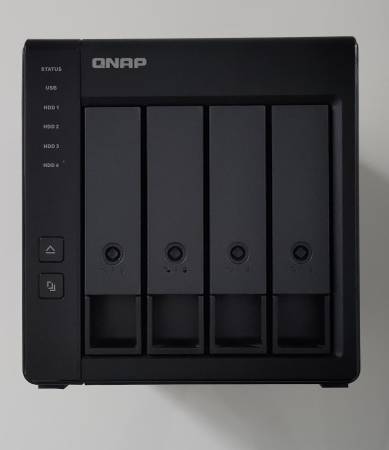
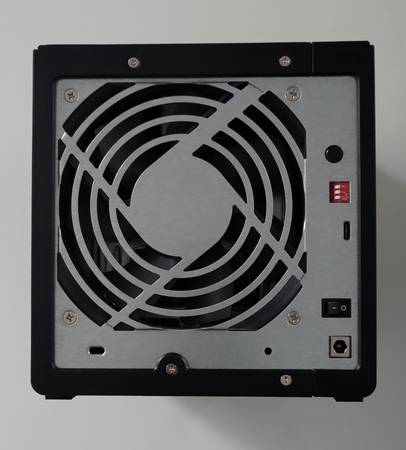
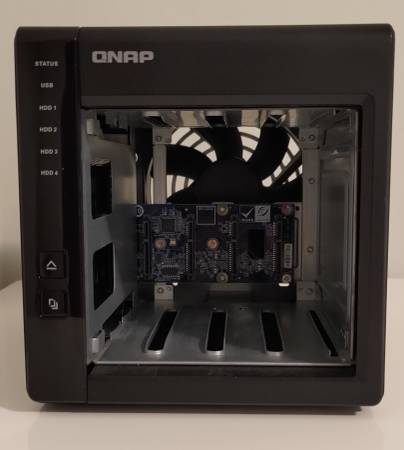
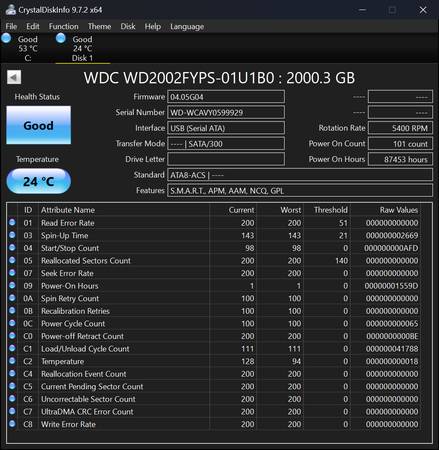
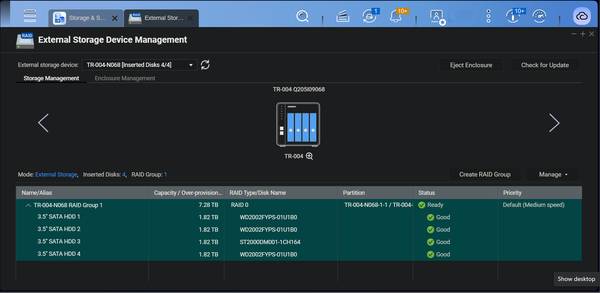
Lightly used. Originally purchased in June 2020. Including 3 WD RE4-GP WD2002FYPS 2 TB Hard Drives and 1 Seagate Barracuda ST200DM001-1CH164 2 TB Hard Drive (CrystalDiskInfo screenshots attached).
Can also sell unit separately without hard drives (please message).
Overview:
The TR-004 USB 3.2 Gen 1 RAID expansion enclosure allows you to expand the capacity of your QNAP NAS and PC. The TR-004 can also be utilized as a DAS (Direct-attached Storage) device, allowing you to directly access its content just by connecting it via USB. The TR-004 features four 3.5-inch SATA drive bays with multiple RAID configuration options and USB 3.2 Gen 1 Type-C connectivity to bring you a highly reliable and secure storage capacity expansion solution.
Non-Server versions of Windows have a 63TB limit for a single volume. Thus, when connecting QNAP storage expansion products, the same limitation applies. For volumes larger than 63TB, it is recommended to use the Windows Server operating system.
USB 3.2 Gen 1 (5Gbps)
USB 3.2 Gen 1 Type-C port* for faster data transfer.
Maximum 1M USB cable is recommended.
Supports SATA drives
Supports up to four SATA drives for reliable read and write performance
Disk mode DIP switch
Disk mode DIP switch to change from Hardware Control and Software Control configurations for setting RAID group.
Lockable drive trays
Lockable hard drive trays to prevent accidental drive removal.
Easy to eject
Eject button for disconnecting the TR-004 from a NAS or computer*.
Requires the QNAP External RAID Manager utility.
Instantly back up files from the TR-004 to the NAS using the One Touch Copy button**.
**Requires a QNAP NAS with a one touch copy button when in external drive mode.
Effective storage expansion with RAID Support
The TR-004 is an ideal storage expansion solution for PCs, especially for laptops which lack the ability to install larger, higher-capacity drives. Featuring four 3.5-inch SATA drive bays and supporting RAID configuration, the TR-004 provides the ability to store a vast number of files and data and to ensure protection against potential drive failure.
Supports various RAID levels
The TR-004 supports a variety of RAID configurations. Depending on your requirements, you can switch between hardware- or software-controlled RAID modes. Move the DIP switches to corresponding positions for your ideal RAID mode: Individual, JBOD, RAID 0, RAID 1/10 or RAID 5. You can also configure the RAID settings from your QNAP NAS, or by using the QNAP External RAID Manager utility on your computer.
Individual Mode
Treats every disk as separate storage space, allowing you to independently access each one.
Drive hot-swap is not supported in this mode
JBOD Mode
All the disks are recognized as a single drive. This allows maximal storage utilization but provides no data protection.
RAID 0 Mode
Data is split amongst the drives. RAID 0 provides the fastest performance but does not protect data from drive failure.
RAID 1/10 Mode
Half of the total storage capacity is used to store data, and the other half keeps a copy of this data. This provides high data protection at the cost of only being able to use half the installed storage space.
RAID 5 Mode
RAID 5 requires at least three drives to use and parity information is distributed among the drives, providing optimized storage capacity and protection against one disk failing.
Software Ctrl Mode
Use this mode to control the RAID configuration from your NAS or computer.
Flexible storage configuration and management
Compared with other RAID enclosures, the TR-004 provides software-controlled configurations for greater management flexibility. Users can configure RAID and monitor disk health using Storage & Snapshots Manager on a QNAP NAS, or by using the QNAP External RAID Manager utility on their computer.
Note: When connecting the TR-004 to a NAS, users can choose to use either the NAS expansion storage mode or the external storage mode.
Use Storage & Snapshots Manager to configure the TR-004 as a storage expansion unit for your QNAP NAS. In addition to RAID configuration, the NAS expansion storage mode supports various NAS functions, including storage pools and snapshots. By choosing external storage mode, you can use the TR-004 as a DAS.
The QNAP External RAID Manager is a utility for Windows and Mac users to set up, monitor, and view the status of the TR-004. Users can easily configure RAID groups on the TR-004 and quickly obtain the status of RAID performance and health at a glance.
Versatile usage scenarios to meet storage expansion needs
The TR-004 meets many storage expansion requirements for home and work use, including:
Scenario 1: Expand the capacity of your NAS
The TR-004 provides an alternative method for users to expand their NAS storage capacity. By connecting the TR-004 to their NAS and using the Storage & Snapshots Manager, users can easily configure and manage their storage expansion. The TR-004 supports a variety of QNAP NAS storage and file management functions, allowing users to build storage pools, find files with Qsirch and organize files with Qfiling.
Note:
1. The TR-004 does not support the following: the TS-128, TS-228, TS-131, TS-231, TS-431, TS-431U, and NAS models that cannot be updated to QTS 4.3.6 (or later).
2. The TR-004 can only be used as an individual storage pool or volume on the NAS. Its storage pool/volume cannot be combined into the connected NAS. NAS applications cannot be installed on the TR-004.
3. Drives can only be migrated from one TR-004 to another TR-004. The files and data stored on drives moved to/from a NAS (or another device) will not be recognized.
4. Drive hot-swap is not supported in the Individual Mode for the TR-004.
5. The performance of the TR-004 may vary based on the specifications and available system resources of the host device.
Use the TR-004 as an alternative to conventional NAS expansion enclosures
As an external hardware RAID device, the TR-004 operates independently and does not require additional NAS system resources. When compared with the UX-500P expansion enclosure, the TR-004 uses less NAS system resources.
Scenario 2: External storage for your NAS
Instead of using the TR-004 to expand the capacity of your QNAP NAS, you can use it as a complimentary storage unit for backing up or moving data. It also allows you to physically migrate huge data collections that would require significant network bandwidth. While connected to the NAS, you can monitor the health and status of the TR-004 by using the Storage & Snapshots Manager on the NAS.
Scenario 3: Expand the storage space of your computer
The TR-004 can quickly add storage space to your computer. You can use the DIP switch to configure a hardware RAID mode or manage it by using the QNAP External RAID Manager utility. The health and status of the TR-004 can also be monitored by using the QNAP External RAID Manager utility.
Note: The QNAP External RAID Manager requires Windows 8.1(or later); Windows Server 2012 R2 (or later); macOS 10.13 (or later)
Scenario 4: Cross-platform file sharing
From your NAS to Windows, Mac, and Linux computers, the TR-004 is compatible with a wide range of devices. This makes it ideal for quickly moving large files between different devices. The TR-004 is even compatible with devices that use the exFAT file system, adding further convenience for accessing and sharing files from a wider range of devices.
Hardware Specs
JBOD Connection Interface: USB
Main chip: Micro processor with hardware RAID
Drive Bay: 4 x 3.5-inch
Drive Compatibility:
•3.5-inch SATA 3Gb/s slot (supports SATA 6Gb/s hard drives with backward compatibility, performance limited to 3Gb/s)
•2.5-inch SATA 3Gb/s slot (supports SATA 6Gb/s hard drives with backward compatibility, performance limited to 3Gb/s)
•2.5-inch SATA 3Gb/s slot (supports SATA 6Gb/s solid state drives with backward compatibility, performance limited to 3Gb/s)
•You can only use one disk type (HDD or SSD) in a RAID group. Combining different types of disk in one RAID group is not supported.
•TR-004 does not support the QDA-A2AR/ QDA-A2MAR.
Lockable with key lock: Key lock
Hot-swappable: Yes
USB 3.2 Gen 1 Port: 1 x Type-C USB 3.2 Gen 1 (USB 3.2 Gen 1)
Buttons:
•Eject
•Set
•One Touch Copy
Form Factor: Tower
Dimensions (HxWxD): 168.5 × 160.2 × 219 mm / 6.63 x 6.31 x 8.62 inch
•Dimensions do not include foot pad (foot pad may be up to 30mm / 1.18 inches high depending on model)
Weight (Net): 3.18 kg
Weight (Gross): 3.18 kg
Operating Temperature: 0 - 40 °C (32°F - 104°F)
Storage Temperature: -20 - 70°C (-4°F - 158°F)
Relative Humidity: 5-95% RH non-condensing, wet bulb: 27˚C (80.6˚F)
Power Supply Unit: Minimum 60W adapter (12VDC), 65W, 100-240V AC, 50/60 Hz
Power Consumption HDD Sleep Mode: 4.17 W
Power Consumption Operating Mode, Typical: 18.21 W
•Tested with drives fully populated.
Sound Level: 18.1 db(A)
Fan: 1 x 12 cm, 12V DC smart fan
System Warning: Buzzer
Kensington Security Slot: Yes
QTS / QuTS hero: Yes
Windows: Yes
Ubuntu: Yes
Mac: Yes
Used as Hardware RAID (DAS): Yes
RAID 10: Yes
RAID 5+ Spare: Yes
RAID 5: Yes
RAID 1: Yes
RAID 0: Yes
JBOD: Yes
Single Disk: Yes
Note: Use only QNAP memory modules to maintain system performance and stability. For NAS devices with more than one memory slot, use QNAP modules with identical specifications and refer to the hardware user manual to install compatible QNAP memory modules.
Warning: Using unsupported modules may degrade performance, cause errors, or prevent the operating system from starting. QNAP reserves the right to replace partial parts or accessories if the original is no longer available from its manufacturer/supplier. Any replacement would be fully tested and verified to meet strict compatibility and stability guidelines and will deliver identical performance to the original.
The terms HDMI, HDMI High-Definition Multimedia Interface, HDMI trade dress and the HDMI Logos are trademarks or registered trademarks of HDMI Licensing Administrator, Inc.
Product images are for illustrative purposes only and may differ from the actual product. Due to differences in monitors, colors of products may also appear different to those shown on the site. Designs and specifications are subject to change without notice.
Software Specs
System modes: Individual, JBOD, hardware RAID 0/1/5/10, Software CTRL (Software control mode is for use with QNAP NAS and Windows/macOS utility)
Features:
1. RAID rebuild in RAID 1/5/10.
2. System, fan, and drive failure monitoring with LED and audio alerts.
3. System sleep during USB cable disconnection and host device hibernation* or shut down.
*Some hosts may not be supported.
4. The unused disk drives automatically become the hot spare ones for the RAID 1 and RAID 5 types.
Minimum operating system requirements:
1. QNAP NAS: QTS 4.3.6 and later
2. Windows: Windows 8.1 and later
3. Mac: macOS X 10.11 and later
System fan: 5-speed automatic fan control
Software utility: Windows/macOS: QNAP External RAID Manager
Supported File Systems: NAS storage (EXT4)External hard drive (EXT3, EXT4, NTFS, FAT32, HFS+, and exFAT)
Note: To use exFAT QNAP NAS you must purchase an exFAT driver license from License Center.
QTS Storage Management Features:
1. General & Extenal Storage Mode
•Overview device, disks, and RAID info and status
•Support for disk’s S.M.A.R.T. monitoring
•Location indication of blinking drive LEDs and sound beeping of enclosure
•External RAID software configuration
•RAID rebuild - Hot spare disk configuration
•RAID recovery
•Firmware update
•Format partition
•Erase partition and device
2. NAS Storage Mode
•The storage pools and volumes in the expansion enclosures are configured via the QTS operating system.
•Volume and LUN snapshots - Snapshot Manager
•Snapshot Cloning - Snapshot Replica - Snapshot Vault
•Support for Windows Previous Versions (CIFS/SMB)
Software utility Features:
1. QNAP External RAID Manager
•Overview device, disks, and RAID info and status
•Support for disk’s S.M.A.R.T. monitoring
•Location indication of blinking drive LEDs and sound beeping of enclosure
•Destop notification to inform abnormal status
•External RAID software configuration
•RAID rebuild - RAID rebuild speed customization
•RAID recovery - Firmware update
•Notification for new version of firmware and application
•System event logs for troubleshooting
•Export event logs to .csv file
Note: Actual performance may vary depending on operating environment and other factors, such as RAID mode, RAID configuration, disk model and capacity.
Note:
•QTS does not support DRM content and some IPv6 services.
•Some data encryption features may be unavailable because of country-specific legislative restrictions.
•Some features may vary by model.
•Designs and specifications are subject to change without notice.